
Download Method CRM – sales logging, customer profiling, QuickBooks integration
Overview
Method CRM is a purpose‑built sales logging and customer profiling solution that shines for QuickBooks users looking to bridge the gap between their accounting data and sales activities. By centralising every transaction, revenue figure, and client interaction in a single, searchable hub, Method CRM removes the tedious manual entry that often hampers small‑to‑mid‑size businesses. The platform is engineered to work across desktop browsers, Windows, macOS, and mobile devices running Android or iOS, ensuring that sales teams stay connected whether they are in the office, on the road, or working from home.
What sets Method CRM apart is its drag‑and‑drop interface, which lets non‑technical users customise dashboards, reporting widgets, and workflow automations without touching a line of code. Once a sale is logged, the tool can automatically push the data into QuickBooks, keeping your books up‑to‑date in real time and eliminating duplicate entries. In addition, the built‑in customer profiling features allow you to capture detailed notes, communication histories, and preferences, giving you a 360‑degree view of each client.
This depth of insight supports smarter marketing campaigns, more accurate forecasting, and ultimately a higher conversion rate. Security is baked in, with encrypted data transmission, role‑based access controls, and regular software updates that keep the platform compliant with industry standards. Whether you are a solo entrepreneur or part of a growing sales department, Method CRM offers a secure, scalable, and user‑friendly environment for managing the full sales lifecycle.
Key Features
- QuickBooks Sync: Real‑time two‑way synchronization ensures every sale, invoice, and payment recorded in Method CRM instantly reflects in your QuickBooks ledger.
- Drag‑and‑Drop Dashboard: Build custom workspaces by dragging widgets such as sales funnels, activity timelines, and KPI charts into place without any programming.
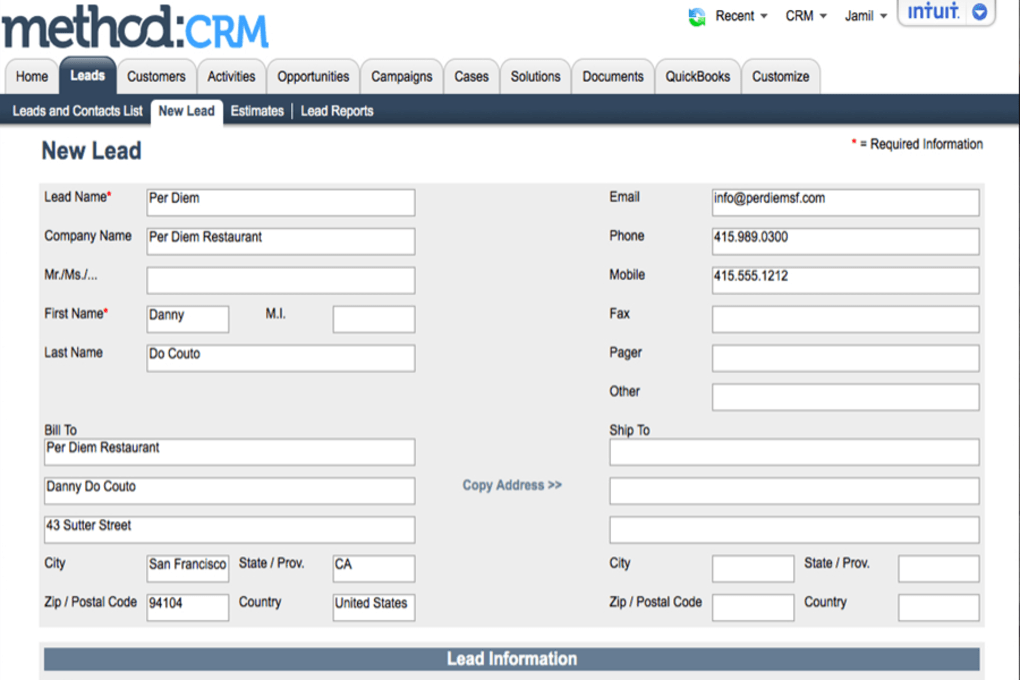
- Comprehensive Customer Profiles: Store contact details, purchase history, communication logs, and custom fields to create a detailed portrait of each client.
- Multi‑Device Accessibility: Fully responsive web app works on Windows, macOS, Android, and iOS, with native mobile apps for on‑the‑go data entry.
- Automation Engine: Set up triggers for follow‑up emails, task assignments, or revenue alerts based on sales stage changes or deal values.
- Advanced Reporting: Generate visual reports on sales performance, pipeline health, and revenue trends, exportable to PDF or Excel.
- Role‑Based Permissions: Assign granular access levels to protect sensitive financial data while empowering sales reps with the tools they need.
- Secure Cloud Hosting: Data is encrypted at rest and in transit, with daily backups and ISO‑27001 compliant infrastructure.
- Integration Marketplace: Connect with email marketing platforms, calendar apps, and third‑party CRMs through pre‑built connectors.
- Free Trial & Affordable Pricing: Start with a 14‑day free trial; paid plans are competitively priced per user per month.
Installation & Compatibility
Getting Method CRM up and running is straightforward, regardless of the operating system you prefer. The solution is delivered as a cloud‑based SaaS platform, which means there is no heavy client software to install on your workstation. Follow these steps to begin:
- Create an Account: Visit the official Method CRM website, click “Start Free Trial,” and fill out the registration form with your business email.
- Verify Email & Set Password: A verification link will be sent to your inbox; after confirming, choose a strong password that meets the security guidelines.
- Connect QuickBooks: In the Settings panel, select “Integrations,” locate QuickBooks, and follow the OAuth flow to grant read/write permissions. The wizard will map your existing chart of accounts to Method CRM fields automatically.
- Configure Your Dashboard: Drag the desired widgets from the left‑hand toolbox onto the canvas. Save the layout as “Default” for all team members or create role‑specific views.
- Invite Team Members: Add users by email, assign roles (Admin, Sales Rep, Analyst), and send invitation links. Each member receives a personalized login.
- Mobile Setup (Optional): Download the Method CRM app from Google Play or the Apple App Store, sign in with the same credentials, and enable push notifications for real‑time alerts.
Supported Platforms: The web interface runs on modern browsers such as Chrome, Firefox, Safari, and Edge on Windows 10/11 and macOS 11+. Native mobile apps are available for Android 8.0+ and iOS 13+. Because the core engine resides in the cloud, hardware requirements are minimal – any device capable of running a current browser will suffice.
After the initial setup, Method CRM automatically checks for updates every 24 hours. When a new feature or security patch is released, you’ll receive an in‑app notification and can apply the update with a single click. This seamless update process eliminates downtime and ensures you always benefit from the latest improvements.
Pros and Cons
Pros
- Deep QuickBooks integration removes manual data entry and reduces accounting errors.
- User‑friendly drag‑and‑drop customization lets non‑technical staff create personalized dashboards.
- Cross‑platform support (Windows, macOS, Android, iOS) keeps sales teams productive everywhere.
- Robust automation rules streamline follow‑ups and improve pipeline velocity.
- Strong security posture with encryption, role‑based access, and regular backups.
Cons
- Advanced reporting may require a learning curve for users unfamiliar with data visualization.
- While the core product is SaaS, offline access is limited to mobile app caching.
- Integration marketplace is growing, but some niche tools still lack direct connectors.
- Pricing per user can add up for larger teams compared with flat‑rate CRM solutions.
- Initial QuickBooks linking requires admin rights in both systems, which can be a barrier for some organisations.
FAQ & Conclusion
Can Method CRM be used without QuickBooks?
Yes. While the QuickBooks sync is a flagship feature, Method CRM functions as a standalone sales and customer profiling tool. You can manually enter transactions or integrate with other accounting platforms via the API.
Is there a limit to the number of contacts I can store?
No hard limit. The cloud infrastructure scales with your data, so you can store thousands of contacts without performance degradation. Only the subscription tier may impose storage caps, which are generous for most small‑business needs.
How secure is my data during the QuickBooks synchronization?
Data is transmitted using TLS 1.2 encryption, and OAuth 2.0 handles authentication. Both Method CRM and QuickBooks adhere to industry‑standard security practices, ensuring that financial information remains protected throughout the sync process.
Can I customize the sales pipeline stages?
Absolutely. The pipeline editor lets you add, rename, or reorder stages via a simple drag‑and‑drop interface. Changes are instantly reflected for all users with the appropriate permissions.
What support options are available if I encounter an issue?
Method CRM offers 24/7 email support, live chat during business hours, and an extensive knowledge base. Premium plans include phone support and a dedicated account manager.
In summary, Method CRM delivers a compelling blend of sales logging, customer profiling, and seamless QuickBooks integration that can dramatically reduce administrative overhead for businesses of all sizes. Its intuitive drag‑and‑drop design lowers the barrier to entry for non‑technical users, while robust automation and reporting capabilities satisfy power users seeking deeper insights. Security and cross‑platform availability further reinforce its suitability for modern, mobile‑first sales teams.
If you’re ready to unify your sales data, improve forecasting accuracy, and keep your accounting records perfectly aligned, download Method CRM today. Start with the free 14‑day trial, explore the customisable dashboards, and experience how a single, secure platform can transform the way you manage customers and revenue.



.png)



